Saturday, January 12, 2013

Reverse Engineering the Subneting Problem

Scenario #1
In this scenario, a computer is connected to the Ethernet switch and has an IP address of 192.168.1.125 and subnet mask 255.255.255.224. Now, we want to find on which subnet the computer belongs to and the IP is usable IP address or not.
Now,
i) We take the lowest subnet mask i.e. in our case, 224 and convert it in binary.
    255.255.255.224 = 255.255.255.11100000
ii) From the binary we know that our incremental = 32 (crossed one from binary).
iii) So, from the incremental, our subnets will be:
     0 - 31
    32 - 63
    64 - 95
    96 - 127
    128 - 179
iv) So, the IP address falls in Network add of 96 and Broadcast address of 127. And yes, it is a valid IP address.

Scenario #2
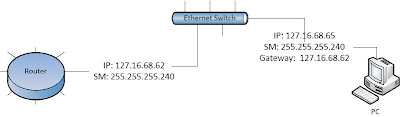
In this scenario, a computer is connected to the Ethernet switch and router and has an IP address of 127.16.68.65 and subnet mask 255.255.255.240. Now, we want to find on which subnet the computer and the router belongs to and the IP addresses are usable or not. And, is there any network problem ??
Now,
i) We take the lowest subnet mask i.e. in our case, 240 and convert it in binary.
    255.255.255.240 = 255.255.255.11110000
ii) From the binary we know that our incremental = 16 (crossed one from binary).
iii) So, from the incremental, our subnets will be:
     0 - 15
    16 - 31
    32 - 47
    48 - 63
    64 - 79 
    
iv) So, from the above the router falls in subnet of 48 and PC subnet of 64. Both the IP addresses        assigned to router and PC are valid but, there is a network problem, because gateway IP and IP of the PC are different.
v) To solve this problem, we have to either assign the IP address subnet of 48 or 64 on both PC and Router.

Wednesday, January 2, 2013

Subnetting Part-I

In network IP address (binary), we use '1' as network bit and '0' as host bit. Subnetting is breaking down the number of hosts to increase the number of networks.


Always remember the table:

| 128 | 64 | 32 | 16 | 8 | 4 | 2 | 1 |

Sub-netting based on networks:
In the above network diagram we need 5 networks from a single network address : 216.21.5.0 / 24.
To subnet the network address into 5 different networks ( a. LAN1, b. LAN2, c. LAN3, d. WAN1, and e. WAN2);

i. We determine the number of networks and convert to binary.
    Here, we have to subnet into 5 networks, converting it into binary from the above table.
     we get. 5 = 00000101
    Here, the underlined 3 - bits are needed to make 5.

ii. Next, we reserve bits in subnet mask and find the incremental.
    In our case, our subnet mask is = 255.255.255.0
                                      In binary, = 11111111.1111111.11111111.00000000
    Now, we reserve the number of bits of subnet mask, equivalent to the bits to make of "5" coz 5       networks. We save the network bits.
                                    therefore, = 11111111.11111111.11111111.11100000
      Now, our new subnet mask will be = 255.255.255.224  (: 128 + 64 + 32)
   
   To find the increment ;  we take the lowest network bit from the customized subnet mask
   i.e. 11100000 (crossed one). So, the increment = 32 .

iii. Finally, we use increment to find the network range.
      Network range is found, starting from '0' subnet.
      so, first IP range will be = 216.21.5.0  - 216.21.5.31
                                                216.21.5.32 - 216.21.5.63
                                                216.21.5.64 - 216.21.5.95
                                              ------------------------------------
                                               --------------------------------- so on.

  
Sub-netting based on hosts:
In the above network diagram let's say, we need 30 hosts in each subnet. Now we have a network address : 216.21.5.0 / 24.
We have to divide the given network address into subnets with 30 hosts in each.
The Process is a like.

i. First we determine the number of hosts and convert it into binary.
   Here, we need 30 hosts per subnet. So, 30 = 00011110
   Here, the underlined 5 - bits are required to be 30.

ii. Next, we reserve bits in subnet mask and find the incremental.

    In our case, our subnet mask is = 255.255.255.0

                                      In binary, = 11111111.1111111.11111111.00000000

Now, we reserve the number of bits of subnet mask. We, here save the host. Because here, we focus on the number of hosts not network.

                                    therefore, = 11111111.11111111.11111111.11100000

      Now, our new subnet mask will be = 255.255.255.224  (: 128 + 64 + 32)  or in bit notation = /27

   To find the increment ;  we take the lowest network bit from the customized subnet mask
   i.e. 11100000 (crossed one). So, the increment = 32 .

iii. Finally, we use increment to find the network range.
      Network range is found, starting from '0' subnet.
      so, first IP range will be = 216.21.5.0  - 216.21.5.31
                                                216.21.5.32 - 216.21.5.63
                                                216.21.5.64 - 216.21.5.95
                                              ------------------------------------
                                               --------------------------------- so on.

I hope it is informative to you, and thank you !!

Monday, December 31, 2012

Default Route

It is configured for unknown destination from the local LAN network. If the network has to access to the internet, it is configured. It is configured in the edge router or border router from where the internet is accessed.

syntax:
HYD(config)# ip route 0.0.0.0 0.0.0.0 <destination ip address or own's exit interface> <enter>

Practice:
i. Initial Configuration.
ii. Do the following configuration on packet tracer.
iii. Test: Ping from PC1 or PC0 to Server1 or Server2 and vice Varese.
iv. You can download the completed file here.
 

Wednesday, December 26, 2012

Some Show Commands

  • RTR# show running-config          
  • RTR# show startup-config
  • RTR# show flash
  • RTR# show version
Magic Keys for help:
  1. [tab] : Completes the command.
  2. ? : Displays the command that are usable in the required mode.

Initial Configurations

Setting Hostname:
Router(Config)# hostname RTR
RTR(Config)#

Putting IP address to an interface:
RTR(Config)# interface f0/0             -----> 0 = Zero
RTR(Config-if)# ip address 192.168.1.1 255.255.255.0
RTR(Config-if)# no shutdown     ----> Activating the interface
RTR(Config-if)# exit
RTR(Config)#

Configuring Console:
RTR(Config)# line console 0                  -----> 0 = Zero
RTR(Config-line)# password console
RTR(Config-line)# exit

Securing VTY ports:
RTR(Config)# line vty 0 4
RTR(Config-line)# password telnet
RTR(Config-line)# exit

Securing Priviledge Mode:
RTR(Config)# enable secret cisco
or, RTR(Config)# enable password cisco

Saving Router's Configuration:
RTR# copy running-config startup-config
or,
RTR# write
or,
RTR# write memory

Modes of router


1) User executive mode:
" Router> "
Commands eg. telnet, traceroute, ping


2) Privilege executive mode:
Router> enable <enter>

" Router# "

3) Global Configuration Mode:
entire configuration is done in this mode
Router# config terminal <enter>
" Router(Config)# "


Physical Connection


start>programs>accessories> communication>hyperterminal

or PuTTY / teraterm